

In 2023 we introduced stargate-mongoose, now known as @datastax/astra-mongoose, which allows you to use Mongoose's familiar API for working with Cassandra through DataStax Astra's Data API.
The idea is that you can set @datastax/astra-mongoose as Mongoose's driver and reuse existing code to connect to Astra's Data API with minimal changes.
Mongoose Studio is a web-based MongoDB GUI built around Mongoose. It uses your models and schemas to provide schema-aware autocomplete, query casting, dashboards, and an AI assistant for writing queries and aggregations.
Given that @datastax/astra-mongoose allows you to connect to the Data API using Mongoose, we figured it would be a neat project to make Mongoose Studio work with Astra's Data API as well.
The new Mongoose Studio Data API plugin makes it possible to browse your Data API tables and collections using Mongoose Studio with a few code changes.
Adding Studio to an @datastax/astra-mongoose App
This Mongoose Studio integration PR adds Mongoose Studio to the typescript-express-reviews sample app in the stargate-mongoose sample apps repository.
That PR shows the complete setup, including the small amount of glue needed to connect Studio to Data API tables or collections.
You can also clone the repo and run the sample app locally - just follow the instructions in the updated README.md for the typescript-express-reviews sample app.
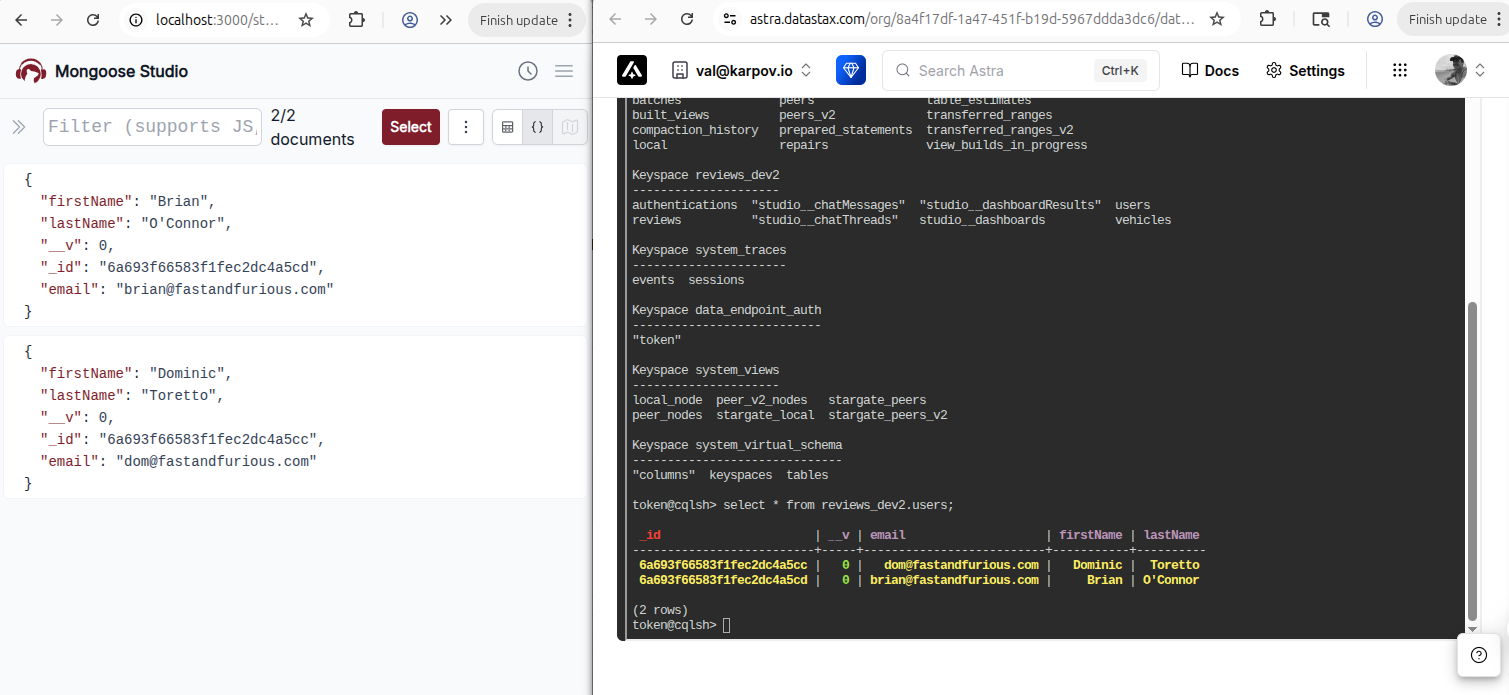
Below is a screenshot showing the same data side by side in Mongoose Studio and Astra's CQL console - with a little bit of glue code, you can interact with data in Apache Cassandra using Mongoose Studio. You can also use Mongoose Studio's AI chat tab to use LLMs to generate scripts for inspecting and updating your data, including generating charts and maps. You'll need to add your own OpenAI, Anthropic, or Gemini API key as described here to use the AI chat tab.
First, install Mongoose Studio alongside the @mongoosejs/mongoose-studio-data-api-plugin package, which is our plugin for connecting Mongoose Studio to Astra's Data API.
npm install @mongoosejs/studio @mongoosejs/mongoose-studio-data-api-pluginIn the file where you configure Mongoose, when using Data API tables, register the tables plugin after setting the @datastax/astra-mongoose driver.
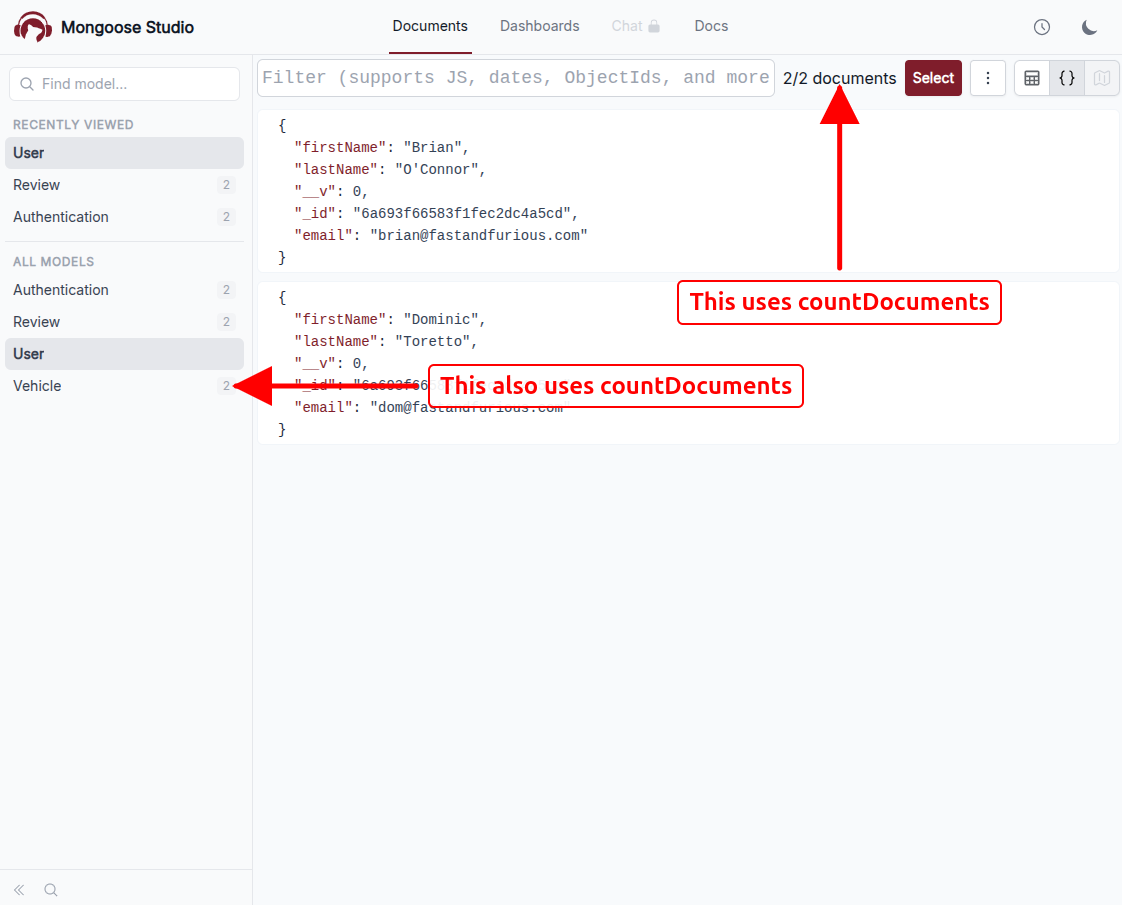
This plugin adds a couple of workarounds to make Mongoose Studio work with Astra's Data API, mostly related to support for countDocuments().
You do not need to use setupMongooseStudioTablesPlugin if you are using Data API collections.
import mongoose from 'mongoose';
import { driver } from '@datastax/astra-mongoose';
import {
  setupMongooseStudioTablesPlugin
} from '@mongoosejs/mongoose-studio-data-api-plugin';

mongoose.set('autoCreate', false);
mongoose.set('autoIndex', false);

const configuredMongoose = mongoose.setDriver(driver);

if (process.env.DATA_API_TABLES) {
  setupMongooseStudioTablesPlugin(configuredMongoose);
}

export default configuredMongoose;
It is important to call setupMongooseStudioTablesPlugin() as soon as possible, before doing any other Mongoose setup.
Currently, @datastax/astra-mongoose requires you to set whether you are using tables or collections at the connection level using isTable, so you can apply this plugin conditionally based on the connection type.
The Express reviews sample app uses a DATA_API_TABLES environment variable to switch between tables and collections for demo purposes.
Your application likely hard-codes whether you are using tables or collections.
Once your Mongoose connection is configured, you can mount Mongoose Studio on your Express app. The important detail is that Mongoose Studio needs a separate connection configured to Data API tables for storing Mongoose Studio's own data:
- Dashboards
- Dashboard evaluation results
- Chat threads
- Chat messages
useDb() gives Mongoose Studio a table-mode connection for the current Astra namespace.
Currently Mongoose Studio always uses tables because Astra is limited to 5 collections, so if Mongoose Studio used collections it would use up 4 of the 5 available collections.
The Data API plugin's mongooseStudioSetup() initializes the tables that Mongoose Studio needs.
import express from 'express';
import studio from '@mongoosejs/studio';
import mongoose from '../models/mongoose';
import {
  mongooseStudioSetup
} from '@mongoosejs/mongoose-studio-data-api-plugin';

const app = express();
// Create a separate connection for Mongoose Studio that always
// uses tables, even if the main connection uses collections.
const studioConnection = mongoose.connection.useDb(
  mongoose.connection.keyspaceName as string,
  { isTable: true }
);

// Mount Mongoose Studio on the Express app.
app.use(
  '/studio',
  await studio.express(null, mongoose.connection, {
    changeStream: false,
    studioConnection
  })
);

await mongooseStudioSetup(studioConnection);
Once the app is running, open /studio in your browser.
You can browse the models in your @datastax/astra-mongoose application, run queries, and inspect the data in your Cassandra tables.
How It Works Under the Hood
While the Data API looks a lot like MongoDB, there are several caveats that Mongoose Studio needs to work around. Mongoose Studio is primarily meant to work with MongoDB, and database GUIs typically use a much broader range of features and capabilities than most applications.
In particular, setupMongooseStudioTablesPlugin() does a few things to make Mongoose Studio work with Data API tables:
- It overrides
countDocuments()andestimatedDocumentCount()to usefind().select({ _id: 1 }).lean()instead. Data API tables do not currently supportcountDocuments()orestimatedDocumentCount(), but Mongoose Studio relies on these functions to display document counts in the GUI.
It removes
$setOnInsertfor update calls. Specifically, Mongoose's timestamps append a$setOnInsertforcreatedAtwhen upserting a document, but Data API tables do not support$setOnInsertfor update calls. Mongoose adds$setOnInsertforcreatedAton updates; the Data API plugin removes these$setOnInsertcalls to avoid errors.It replaces atomic
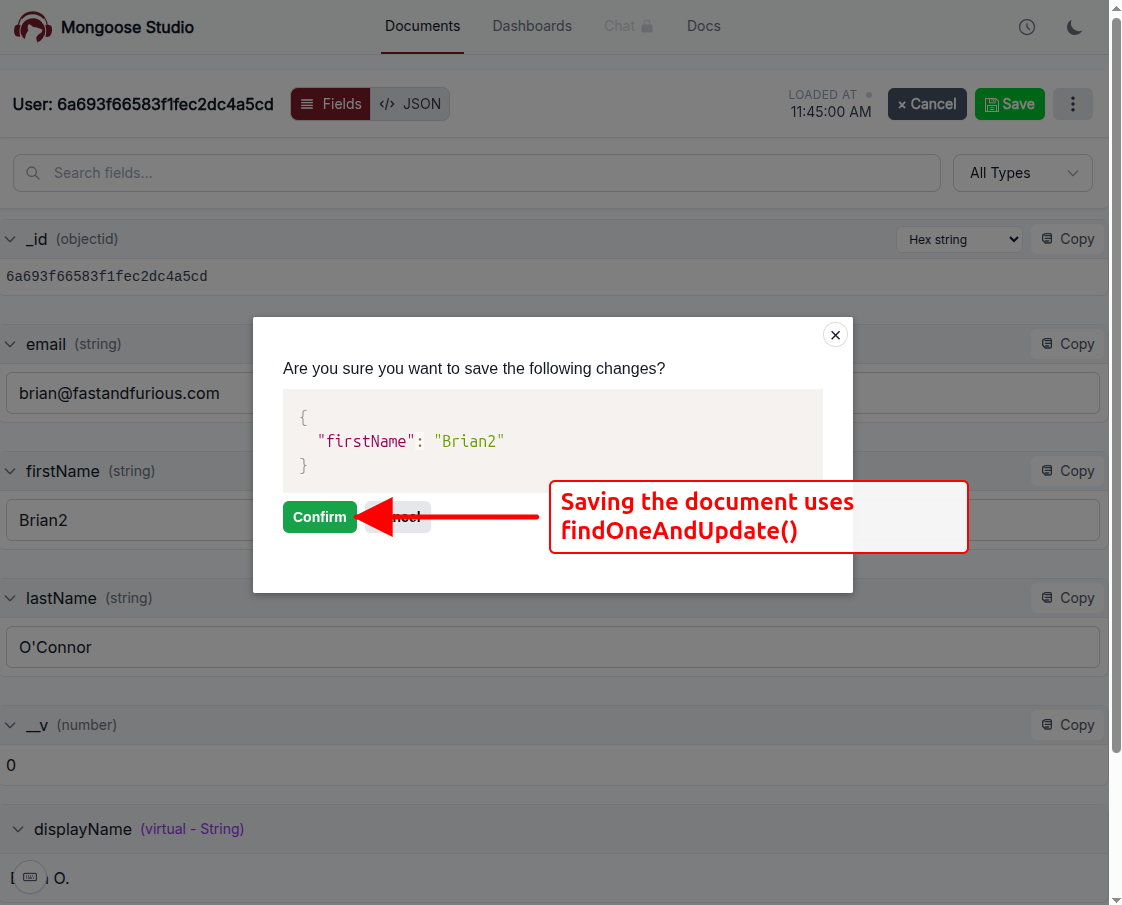
findOneAndUpdate()with anupdateOne()followed by afind(). Data API tables do not support atomicfindOneAndUpdate()calls, but Mongoose Studio relies onfindOneAndUpdate()for updating documents through the GUI.
The above changes apply to the user's Mongoose models in the case they are using Mongoose Studio with Data API tables. Mongoose Studio works with Data API collections without any further changes.
The mongooseStudioSetup() function configures Mongoose Studio's own data store to use Data API tables.
Like setupMongooseStudioTablesPlugin(), it removes $setOnInsert fields for update calls for all models.
It also updates several of Mongoose Studio's internal data structures to work with Data API tables:
- Chat message tool calls and chat message execution results are defined as user-defined types (UDTs). Data API tables only support Mongoose document arrays if they are defined as an array of UDTs, so Mongoose Studio converts the Mongoose document arrays into explicit arrays of UDTs by adding
udtNameto the schema options. - Dashboard results, dashboard errors, and chat message tool call inputs are defined as the Mongoose
Mixedtype, which allows any type of value. Data API tables do not supportMixedtypes, somongooseStudioSetup()converts these types toStringwith getters and setters for serializing the raw data as JSON.
Once mongooseStudioSetup() updates the schemas, it also uses the syncTypes() function to sync the new UDTs to the Data API, and syncTable() with tableDefinitionFromSchema() to create Data API tables with schemas derived from the Mongoose schemas.
Moving On
Mongoose Studio is a web-based MongoDB GUI for Mongoose.
With @mongoosejs/mongoose-studio-data-api-plugin, you can also use Mongoose Studio with Apache Cassandra via DataStax Astra DB.
If you want to try it out, start with the Mongoose Studio integration PR and the typescript-express-reviews sample app.
For more background, see our earlier posts on Cassandra support for Mongoose and astra-mongoose.
Try it out and let me know what you think!