

One of our favorite Mongoose Studio features is also one that most people will never notice: query results stream to the frontend using Server-Sent Events (SSE). Most database GUIs use pagination to display results: load a fixed number of documents at a time, display them when all the documents are available. For smaller datasets and fast queries, pagination and SSE are hard to distinguish. But when you have a slow query that returns a few documents but not enough to fill the full page, SSE can mean the difference between getting the answer immediately or waiting for minutes.
For example, the following video shows Mongoose Studio streaming the results of a query for $where: sleep(1000)||true: a query that sleeps for 1 second between returning each document.
With pagination, you would need to wait at least 20 seconds to view even a single result.
I implemented this because sometimes I end up running a slow query in the GUI and I want to start looking at the first couple of results while the query is still running to decide whether I want to continue running the query. Potentially waiting for minutes for a full page to load or adding a limit only to have to rerun the query later was frustrating.
How Server-Sent Events (SSE) work
Server-Sent Events are a way to stream data from the server to the client over HTTP. SSE is like a standard HTTP request, but the server sends data to the client as it becomes available, rather than waiting for the entire response to be ready. SSE is reasonably easy to implement with Express, just requires some extra boilerplate. For example, the below Express code sends back a hardcoded list of words over SSE, one word at a time, with a 1 second delay between each word.
const express = require('express');

const app = express();
const words = ['Lorem', 'ipsum', 'dolor', 'sit', 'amet'];

app.get('/sse', (req, res) => {
  // Set the headers that tell the client this is an SSE stream.
  res.set({
    'Content-Type': 'text/event-stream',
    'Cache-Control': 'no-cache',
    'Connection': 'keep-alive'
  });
  res.flushHeaders();

  // Send back the first 5 words of lorem ipsum, one at a time,
  // with a 1 second delay between each word.
  let i = 0;
  const interval = setInterval(() => {
    if (i >= words.length) {
      clearInterval(interval);
      res.end();
      return;
    }
    // Each SSE message is a line prefixed with `data: ` and terminated
    // by a double newline.
    res.write(`data: ${words[i]}\n\n`);
    ++i;
  }, 1000);

  // Clean up the interval if the client disconnects early.
  req.on('close', () => clearInterval(interval));
});

const server = app.listen(3000, () => {
  console.log('Listening on port 3000');
});
If this feels similar to ChatGPT or Claude's streaming responses, "you're absolutely right!" LLM chatbots frequently use SSE to stream responses back to the client. WebSockets are another option for streaming, but SSE often plays nicer with load balancers, reverse proxies, and other HTTP infrastructure because SSE is just a plain old HTTP request under the hood.
Run the above server and run curl http://localhost:3000/sse, you'll get back the following result.
$ curl http://localhost:3000/sse
data: Lorem

data: ipsum

data: dolor

data: sit

data: amet
The data lines come in one at a time, with a 1 second delay between each word.
Plugging in MongoDB Cursors
Cursors are how you can load documents from MongoDB one at a time.
For example, here's how you can use a cursor to stream words from a Word collection using an async iterator.
const wordsCursor = await Word.find().cursor();
for await (const word of wordsCursor) {
  console.log(word.text);
}
Under the hood, MongoDB cursors use batching, which means the cursor will load 1000 documents by default, but give you the documents one at a time.
For example, consider the following code, which uses a cursor to load words from the words collection with the sleep(1000) condition to simulate a slow query.
If you make a request to /sse, you'll see the words appear in one batch after a 5 second delay, not one at a time with a 1 second delay between each.
const express = require('express');
const mongoose = require('mongoose');

const words = ['Lorem', 'ipsum', 'dolor', 'sit', 'amet'];

const Word = mongoose.model('Word', new mongoose.Schema({
  order: { type: Number, required: true, unique: true },
  text: { type: String, required: true }
}));

const app = express();

app.get('/sse', async (req, res) => {
  res.set({
    'Content-Type': 'text/event-stream',
    'Cache-Control': 'no-cache',
    'Connection': 'keep-alive'
  });
  res.flushHeaders();

  const cursor = Word.find({ $where: 'sleep(1000) || true' })
    .sort({ order: 1 })
    .cursor();

  for await (const doc of cursor) {
    res.write(`data: ${doc.text}\n\n`);
  }

  res.end();
});

async function run() {
  await mongoose.connect('mongodb://127.0.0.1:27017/sse_test');

  // Upsert the 5 words into the Word model on startup.
  await Promise.all(words.map((text, order) => Word.updateOne(
    { order },
    { $set: { text } },
    { upsert: true }
  )));

  app.listen(3000, () => console.log('Listening on port 3000'));
}

run().catch(err => {
  console.error(err);
  process.exit(1);
});
That's cursor batching in action: the cursor waits for a full batch before returning any results.
However, batchSize is configurable.
Mongoose Studio uses batchSize(1) under the hood because that makes more sense for our use case of surfacing the documents to the client as soon as they're ready without batching.
This increases the number of requests made to the MongoDB server, but I think the additional overhead is worth the improved responsiveness.
Add batchSize(1) to the above code and you'll see the words appear one at a time with a 1 second delay between each.
const cursor = Word.find({ $where: 'sleep(1000) || true' }).batchSize(1).sort({ order: 1 }).cursor();Handling the Response on the Frontend
Browsers have a built-in EventSource class that supports SSE.
EventSource makes SSE easy: create a new new EventSource(url) and register a message event handler.
The following example creates an EventSource that listens for messages from the server and logs them to a <div>.
<!DOCTYPE html>
<html lang="en">
<head>
  <meta charset="utf-8">
  <title>SSE EventSource Test</title>
  <style>
    body { font-family: sans-serif; max-width: 600px; margin: 40px auto; }
    #output { border: 1px solid #ccc; padding: 12px; min-height: 120px; font-family: monospace; white-space: pre-wrap; }
    button { padding: 8px 16px; font-size: 16px; }
  </style>
</head>
<body>
  <h1>SSE EventSource Test</h1>
  <button id="start">Start streaming</button>
  <div id="output"></div>

  <script>
    const output = document.getElementById('output');

    function log(line) {
      output.textContent += line + '\n';
    }

    function run() {
      output.textContent = '';

      // EventSource is the browser's built-in SSE client. It handles the
      // `data: ` / `\n\n` parsing for us, so we just listen for messages.
      const source = new EventSource('http://localhost:3000/sse');

      source.onmessage = event => {
        log(new Date().toISOString() + ' received: ' + event.data);
      };

      source.onerror = () => {
        log('Stream closed');
        source.close();
      };
    }

    document.getElementById('start').addEventListener('click', run);
  </script>
</body>
</html>
EventSource is easy to work with, but it comes with a couple of caveats:
- No custom headers support:
EventSourcedoesn't support setting custom headers, you need to usefetch()instead. - GET only. If you need to use POST for SSE, you'll need to use
fetch()instead.
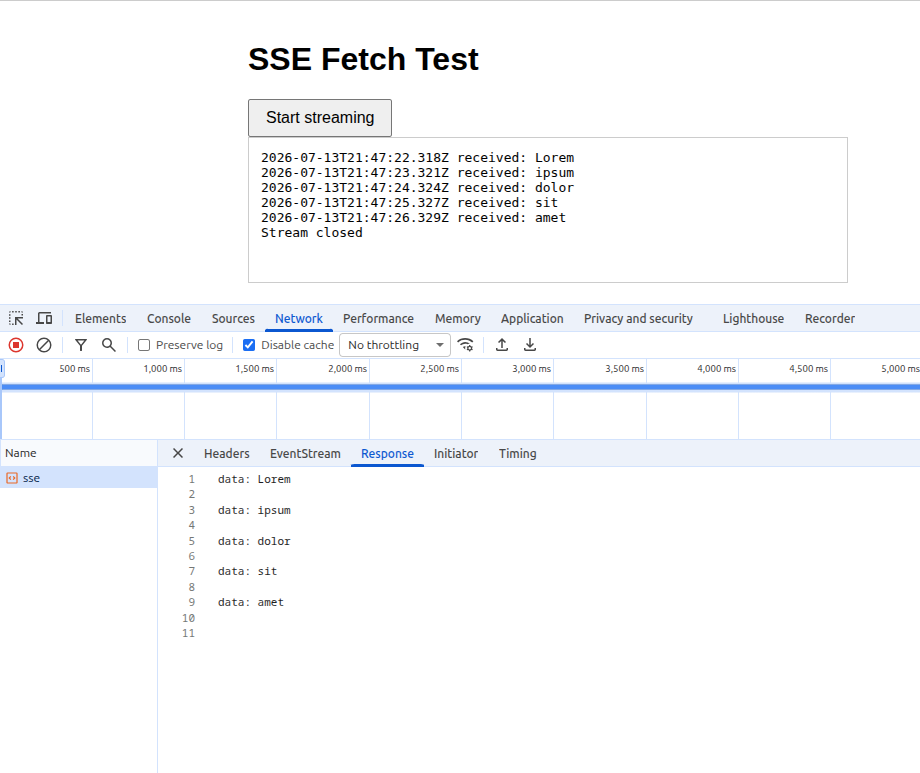
Here's what it looks like in the browser:
Authorization Caveat
Unfortunately, EventSource doesn't support setting custom headers, so if you're using an authorization header for authentication instead of a cookie, you'll need to use fetch() instead.
Thankfully fetch() has built-in support for SSE, so no need to add any external packages to consume SSEs on the frontend.
The following HTML shows an example of consuming an SSE stream using fetch() - there's a bunch of boilerplate with getReader() and TextDecoderStream().
The reader emits text chunks that you need to buffer and split into individual messages.
<!DOCTYPE html>
<html lang="en">
<head>
  <meta charset="utf-8">
  <title>SSE Fetch Test</title>
  <style>
    body { font-family: sans-serif; max-width: 600px; margin: 40px auto; }
    #output { border: 1px solid #ccc; padding: 12px; min-height: 120px; font-family: monospace; white-space: pre-wrap; }
    button { padding: 8px 16px; font-size: 16px; }
  </style>
</head>
<body>
  <h1>SSE Fetch Test</h1>
  <button id="start">Start streaming</button>
  <div id="output"></div>

  <script>
    const output = document.getElementById('output');

    function log(line) {
      output.textContent += line + '\n';
    }

    async function run() {
      output.textContent = '';
      const res = await fetch('http://localhost:3000/sse');

      // The response body is a ReadableStream. Rather than awaiting the entire
      // response with `res.text()`, we read it chunk by chunk as the server
      // sends each Server-Sent Event.
      const reader = res.body.pipeThrough(new TextDecoderStream()).getReader();

      let buffer = '';
      while (true) {
        const { value, done } = await reader.read();
        if (done) {
          break;
        }

        // SSE messages are separated by a blank line (`\n\n`). Buffer partial
        // chunks and pull out complete messages as they arrive.
        buffer += value;
        let index;
        while ((index = buffer.indexOf('\n\n')) !== -1) {
          const message = buffer.slice(0, index);
          buffer = buffer.slice(index + 2);

          // Each SSE message line is prefixed with `data: `.
          const data = message.replace(/^data: /, '');
          log(new Date().toISOString() + ' received: ' + data);
        }
      }

      log('Stream closed');
    }

    document.getElementById('start').addEventListener('click', () => {
      run().catch(err => log('Error: ' + err.message));
    });
  </script>
</body>
</html>
This is how Mongoose Studio parses SSE events because Mongoose Studio currently uses the Authorization header, and because it is more reliable for us to use POST over GET because this endpoint takes in a potentially deeply nested query object.
We may switch to EventSource in the future - we want to switch off of Authorization and use cookies instead, and POST is not necessarily a requirement.
EventSource Error Handling
EventSource fires error events when the connection is lost or the server closes the stream. Any errors that occurred on the backend need to be reported as separate events. EventSource does not report errors via HTTP status, nor is there a notion of a distinct error event type. Plus, in order to send any SSE events, your server needs to return an HTTP 200 status: there's no way to change the response status if there's an error while streaming events.
For example, suppose we have a maxTimeMS timeout on the MongoDB cursor. The following cursor will return 2 results and then throw an error.
  const cursor = Word.find({ $where: 'sleep(1000) || true' })
    .batchSize(1)
    .maxTimeMS(2500)
    .sort({ order: 1 })
    .cursor();
In order to handle this error, we can wrap the cursor in a try...catch block and explicitly send a server-error event if an error occurs.
  try {
    for await (const doc of cursor) {
      res.write(`data: ${doc.text}\n\n`);
    }
  } catch (err) {
    res.write(`event: server-error\ndata: ${JSON.stringify({ message: err.message })}\n\n`);
  } finally {
    res.end();
  }
On the frontend, you need to listen to the server-error event and handle it separately.
source.addEventListener('server-error', event => {
  const { message } = JSON.parse(event.data);
  log(new Date().toISOString() + ' server error: ' + message);
  source.close();
});
Moving On
Server-Sent Events are a standard way to stream events from a server to a client over HTTP. SSEs are generally considered easier to work with and more reliable than WebSockets because SSEs are just a special kind of HTTP request. Mongoose Studio uses SSEs combined with a MongoDB cursor with batchSize(1) to ensure you get each individual query result as soon as it becomes available, without any buffering or batching. SSEs have saved us hours of waiting for query results to become available.